
12 Desk Cable Management Ideas (No More Cord Chaos)

Twelve ways to end the tangle under your desk — an under-desk tray, a cable box, Velcro bundles, one sleeve down the leg, and labels so you never unplug the wrong thing again.
Table of Contents (12 Ideas)
- 1.Mount an Under-Desk Tray and Get the Power Strip Off the Floor
- 2.Hide What Is Left in a Cable Box on the Floor
- 3.Bundle the Loose Cords With Velcro Ties, Not Zip Ties
- 4.Run One Neat Sleeve Down the Desk Leg
- 5.Turn a Shallow Drawer Into a Charging Drawer
- 6.Clip Cables Along the Back Edge So They Stop Falling
- 7.Add a Cable Spine if Your Desk Goes Up and Down
- 8.Use a Raceway Channel When You Want the Run Fully Covered
- 9.Drop Cables Straight Through a Desk Grommet
- 10.Shorten the Slack Instead of Storing It in a Heap
- 11.Give Your Daily Chargers One Small Dock, Not the Whole Desk
- 12.Label Every Plug Before You Call It Done
Every desk starts with good intentions and ends with the same small jungle: a power strip on the floor, six cords braided into one mystery rope, and a charger that slides behind the desk every single day.
Here is the truth about cords — they are not messy because there are too many of them. A normal desk runs a laptop, a monitor, a lamp and two or three chargers. That is maybe eight cables. Eight cables is nothing. The chaos comes from cables with no route and no home, each one dropped where it landed. These 12 desk cable management ideas give every cord a route and a home: up off the floor, bundled where it travels, hidden where it rests. Most of the gear costs under $25 a piece, and the whole job takes one focused afternoon. Start with the tray, end with the labels, and your under desk cable management stops being a weekend project and starts being a thing you simply do not think about anymore.
 Save Pin
What you'll need
Four things cover almost every idea on this list: an under-desk cable management tray, a pack of Velcro cable ties, a cable management box and a braided cord sleeve. Buy the tray first — it decides where everything else goes. The full set runs about $50 to $70 if you buy it all at once, less if you raid the drawer of spare straps you probably already own.
Mount an Under-Desk Tray and Get the Power Strip Off the Floor

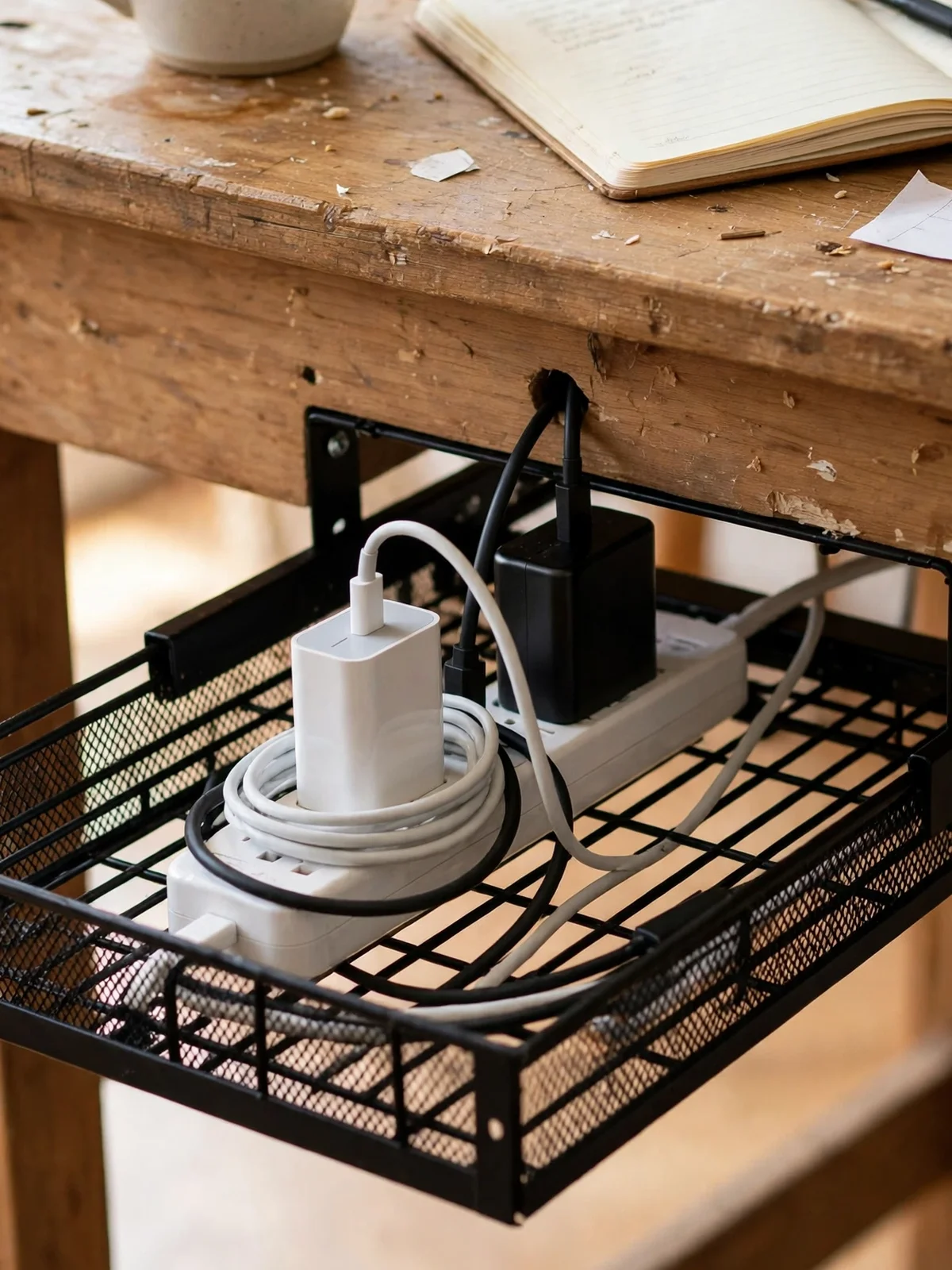
Start here, because this one move does about half the work. A cable management tray — a simple wire basket, usually 16 to 17 inches long, $15 to $25 — screws or clamps under the back of the desk and holds the whole power strip up off the floor. Charger bricks, the strip itself and most of the slack live inside it. This is the heart of good under desk cable management: one hidden home for power, instead of a strip on the carpet collecting dust and getting kicked loose. Leave an inch of air around big charger bricks so heat can escape, and mount the tray toward the back so your knees never meet it. From your chair, the floor suddenly looks empty.
Hide What Is Left in a Cable Box on the Floor

Some desks will not take a tray — glass tops, thick aprons, a landlord who would notice screw holes. That is what a cable management box is for. It is just a lidded box, about 12 to 16 inches long, $18 to $30, with slots at both ends. The power strip goes inside, cords enter one end and leave the other, and the lid turns the whole tangle into one calm object your eye skips over. Wooden lids look best on wood floors; plain white disappears against a white wall. Two honest warnings: do not cram in more than one strip, and lift the lid every few months. Boxes collect a shocking amount of dust, and a quick wipe keeps it that way.
Bundle the Loose Cords With Velcro Ties, Not Zip Ties

Loose cords behave like they are plotting something. Gather any cables that travel the same route — monitor power and display cable, say — and bind them every 12 inches or so with Velcro cable ties. A roll or a pack of pre-cut straps runs $7 to $12 and lasts for years. Velcro wins over zip ties for one simple reason: you will change this setup. A new monitor, a different laptop, a moved desk — with Velcro the bundle opens in two seconds and closes again, no scissors balanced near a cable you actually need. Keep the bundle snug, not strangled. Cables bent hard at the connector are cables you will be replacing, and nobody wants to buy the same charger twice.
Run One Neat Sleeve Down the Desk Leg

After the tray and the bundles, most desks are down to a single journey: from under the desk to the wall outlet. A braided cable sleeve, $10 to $16 depending on length, wraps that whole run into one clean cord that hugs the desk leg on its way down. Measure before you buy — most legs need 4 to 6 feet of sleeve, and sleeves come in fixed lengths that do not stretch. Feed the cables in with the little tool most sleeves include, or fold them in a few inches at a time with your thumbs. Pick a color close to your leg or your wall and the run nearly vanishes. It is the difference between cables going somewhere and one quiet line.
Start here if you do one thing
Do the cable management tray and the Velcro cable ties together, in that order, on the same afternoon. The tray gives the power a home and the ties give the cords a route — that pairing alone fixes the view from your chair and the tangle at your feet. Everything else on this list is refinement.
Turn a Shallow Drawer Into a Charging Drawer

Phone cables are the worst offenders on a desktop because they are used twice a day and stored never. If your desk has a shallow top drawer, give it a second job. Run one small power strip into the back of the drawer — many desks have a gap behind the drawer box, and a drilled hole in the drawer back works too — then coil each charging cable in its own section of a drawer divider tray. Phone, tablet and earbuds charge inside, door closed, desktop clear. This pairs well with the surface rules in our small desk organization ideas: the desk stays a workspace, and charging stops being decor. Leave the drawer cracked open on hot days if a big brick is working hard in there.
Clip Cables Along the Back Edge So They Stop Falling

You know this sound: a charger sliding off the back of the desk and landing behind it, again. Adhesive cable clips, about $8 for a pack, fix it in a minute. Stick three or four along the back edge or just under it, thread the cables you reach for daily through them, and the ends stay parked at the desk edge instead of doing their daily disappearing act. Renters, this one is fully yours — the clips peel off clean and leave nothing behind. Space them for the cables you actually unplug: phone charger at the right, laptop cable at the left, one spare in the middle. The clips you never use are the ones that end up gummed with dust by spring.





Add a Cable Spine if Your Desk Goes Up and Down

A standing desk breaks every fixed cable plan, because the desk moves and the outlet does not. The fix made for the job is a cable spine — a chain of interlocking segments, $20 to $35, that carries your cables from under the desktop down to the floor and flexes as the desk rises. Good cable management for standing desk setups follows one rule: everything on the desk plugs into a strip mounted under the desk, and only two things travel to the floor — the spine with the strip's own cord inside it, and nothing else. Set the length at the desk's highest position, then test the full range twice. A spine that goes tight at the top will yank a plug out mid-meeting, which is a special kind of embarrassing.
Use a Raceway Channel When You Want the Run Fully Covered

A tray holds cables. A cable raceway channel hides them completely. It is a flat rectangular channel, usually sold in 15 to 17 inch sections for $15 to $25 a set, that mounts under or behind the desk with screws or strong adhesive pads. Cables lay inside, the cover snaps on, and the run reads as part of the desk itself. Raceways suit long straight runs — across the back of a wide desk, or down a wall to a low outlet. Cut sections to length with a fine saw, and leave one section's cover loose if it carries a cable you swap often. Honestly, for most home desks the tray from idea one is enough. The raceway is for desks that face the room, where the back is on show.
Drop Cables Straight Through a Desk Grommet

If your desk has a grommet hole in the back corner — plenty of flat-pack desks do — use it for its actual job. Feed the monitor and laptop cables straight down through it instead of draping them over the back edge. It is the simplest answer to how to hide desk cords on the surface itself: they leave the desk the second they are done being useful, and the desktop keeps zero cable on it. No hole? A desk grommet kit, $9 to $14, plus a hole saw adds one in about fifteen minutes, though that is a job for a desk you own, not a rental. The soft brush or flap ring in most grommets matters more than it looks — it keeps cables from sawing against a raw wood edge for two years.
The rule behind all 12
One route, one home, nothing on the floor. Every cable should travel one planned route — down, along, up — and rest in one planned home, whether that is the cable management tray, the box or a drawer. If a cord is somewhere else, it is not stored. It is just waiting to become a tangle.
Shorten the Slack Instead of Storing It in a Heap

Most cable chaos is not too many cables. It is too much cable — six-foot cords doing a two-foot job, with the extra four feet heaped behind the desk. Two fixes. First, swap the worst offenders for shorter cables; a 1 or 3 foot version of a monitor or USB cable costs $8 to $12 and removes the heap at the source. Second, for the slack that stays, coil it once into a neat loop and park it under the desk with a wide Velcro strap on a small adhesive hook. A coil hangs tidy and off the floor. A heap traps dust, hides the one plug you need, and somehow tangles itself while nobody is in the room. Nobody has explained that last part. It just happens.
Give Your Daily Chargers One Small Dock, Not the Whole Desk

Even with a charging drawer, most of us keep one or two things charging in the open. Contain them. A desktop charging station, a small dock around $20 to $30, stands your phone and earbuds in slots and sends exactly one cable out the back. Compare that to the usual setup: three cables, three wall bricks, an earbud case sliding toward the edge. The dock turns charging into one object with one cord, parked in one corner, and it works just as well on a desk in a full room setup like the ones in our small home office organization ideas. Choose a dock with short built-in cables or room to hide your own — a dock with long cords trailing out of it has missed its own point.
Label Every Plug Before You Call It Done

Last step, ten minutes, and future you sends thanks. Plug everything in, sit under the desk once, and label each cord at the strip end — cable label tags, about $6 for a pack, or a strip of masking tape and a pen if you want it done today. Monitor, laptop, lamp, speaker, done. The payoff comes on the day something has to be unplugged: no guessing, no following a cable hand over hand through the dust, and absolutely no unplugging the router during someone else's video call. Label both ends of any cable longer than your arm. It feels fussy for exactly one setup session, and like genius every time after that. This is also the moment to pull out any cable that serves nothing anymore — every desk has one, and it is always a mystery.
You do not need all twelve, and you do not need a free Saturday. The tray, a handful of Velcro ties and one sleeve — an afternoon and about $35 — will take most desks from jungle to quiet. Add the box, the clips and the labels as your setup asks for them.
What you are really buying is fewer small annoyances: no charger fishing expeditions behind the desk, no mystery plugs, no dust farm at your feet. Cords will keep arriving — a new monitor here, a work laptop there — but now each one has a route to follow and a home to land in. If the cables were only one symptom of a bigger pile-up, our 30-day declutter challenge clears the backlog room by room, and our hidden storage ideas find homes for everything else the desk was holding. Calm desk, calm start to the day. The cords just have to stop shouting first.
Desk Cable Management FAQs
Expert answers & styling advice
What is the best way to manage cables under a desk? ▼
Mount a cable management tray under the back edge, put the power strip inside it, and route every cable down into the tray and up only where it has to reach a device. Bundle cables that travel together with Velcro cable ties, and send the one remaining run to the wall outlet inside a braided cord sleeve down the desk leg. From your chair, you should see no cable touching the floor.
How do I hide desk cords without drilling holes? ▼
Use a cable management box on the floor for the power strip, adhesive cable clips along the back edge, and a clamp-on tray instead of a screw-on one. Every one of those lifts off cleanly, which makes the whole setup renter-friendly. A cord sleeve down the leg covers the last visible run, no tools involved.
Is cable management different for a standing desk? ▼
Yes, in one important way: the desk moves and the outlet does not. Mount the power strip under the desk so every device cable stays on the desk, then use a flexible cable spine to carry the strip's single cord down to the floor. Test the desk at its full height before you tidy anything else — cables need enough slack at the top position, with a little to spare.
How do I keep charger cables from falling behind the desk? ▼
Park them. Stick adhesive cable clips along the back edge and thread each daily charger through one, or keep the ends in a small desktop charging station so the weight of the dock holds them in place. The cable falls because nothing is holding its end. Give the end a parking spot and the problem ends the same day.
Can I put a power strip inside a closed cable box safely? ▼
Yes, with two common-sense limits. Use one strip per box, pick a box with ventilation slots or a lid that does not seal airtight, and do not bury high-draw bricks under a pile of cords — they need a little air around them. Check the box after the first full workday; it should feel warm at most, never hot. If it feels hot, the box is too small or too full.